
Your IT recycling, all in one place
Jobs, assets, certificates, documents and rebates in one secure client portal
- Every collection listed with its status and asset count
- A certificate of data sanitisation for every data-bearing device
- Collection notes, waste transfer notes and certificates filed by job
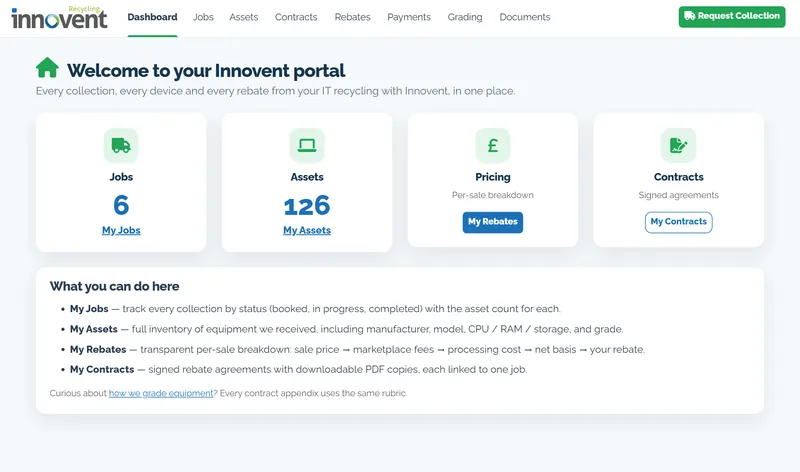
Illustrative example figures from the Innovent demo client portal
What is the Innovent client portal? The Innovent client portal is one secure online portal for each client. It shows every collection and every device we collect, a certificate of data sanitisation for each data-bearing device, waste transfer notes and other documents filed by job, and an itemised breakdown of any rebate.
Every collection, every device and every document, in one secure client portal. Take the tour below to see what each screen shows.
Inside your client portal
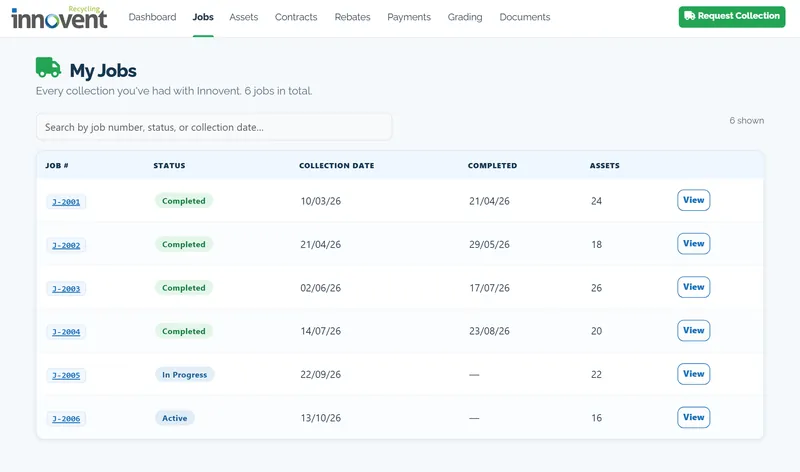
MY JOBS
Every collection, with its status
My Jobs lists each collection by job number, with its status, collection date, completion date and number of assets.
Search by job number, status or collection date, and open any job from the list.
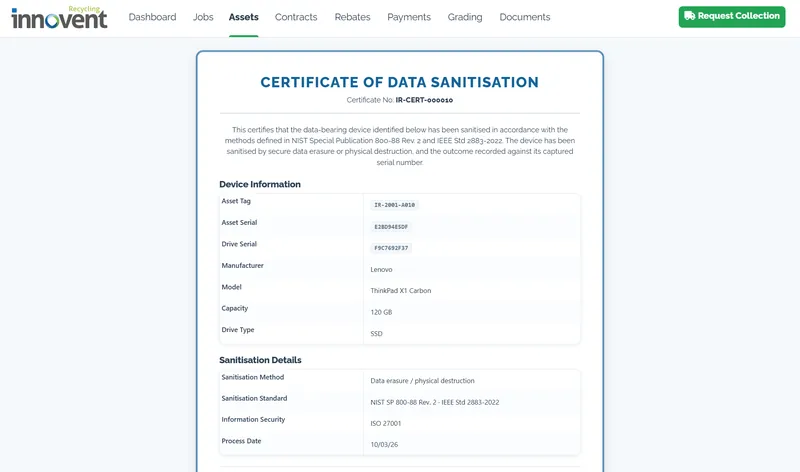
CERTIFICATES
A certificate for every data-bearing device
Each certificate of data sanitisation records the asset tag, asset serial, drive serial, make, model, capacity and drive type, with the sanitisation method and the standard used, NIST SP 800-88 Rev. 2.
Download it from the device, from its job or from your documents.
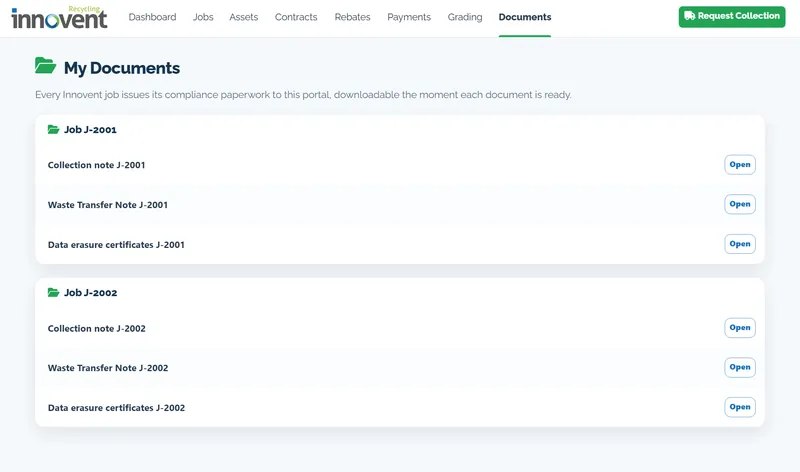
MY DOCUMENTS
Your paperwork, filed by job
My Documents groups everything under the job it belongs to: the collection note, the waste transfer note and the data erasure certificates.
Each document can be downloaded as soon as it is ready.
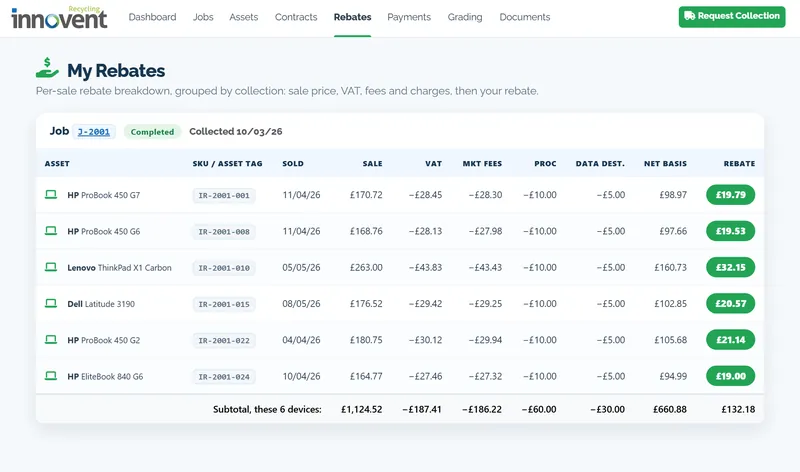
MY REBATES
An itemised rebate for each device sold
My Rebates groups each sale under its collection and shows every deduction, so you can see how the rebate for each device was reached.
How your rebate is worked out
- Sale price
- minus VAT
- minus marketplace fees
- minus processing and data destruction
- = net basis
- Your rebate: your share of the net basis
Illustrative example figures from the Innovent demo client portal
What’s in the portal
The portal has a page for each part of your account: Dashboard, Jobs, Assets, Contracts, Rebates, Payments, Grading and Documents.
- My Jobs: each collection, booked, in progress or completed, with its asset count.
- My Assets: every device with its manufacturer, model, CPU, RAM, storage and grade.
- My Rebates: a per-sale breakdown from the sale price to your rebate.
- My Contracts: your signed rebate agreements as downloadable PDFs, each linked to one job.
- My Documents: collection notes, waste transfer notes and certificates, filed by job.
Certificates and documents
Every data-bearing device gets its own certificate of data sanitisation, and each job has its collection note and waste transfer note. Read more about our asset reporting and certification and secure data destruction.
How equipment is graded
The Grading page shows how we grade equipment, and every contract appendix uses the same rubric. Working equipment may have resale value: see our IT equipment buyback service.
Request your next collection
Use the Request Collection button in the portal, or book a collection online. Collection is free for 10 or more laptops, PCs or servers anywhere in the UK.
Frequently Asked Questions
What is the Innovent client portal?
The Innovent client portal is one secure online portal for each client. It shows every collection and every device we collect, a certificate of data sanitisation for each data-bearing device, waste transfer notes and other documents filed by job, and an itemised breakdown of any rebate.
Where do I find my certificates of data sanitisation?
Each certificate can be downloaded from the device, from the job it belongs to or from My Documents in your client portal.
What documents are in the client portal?
My Documents groups your paperwork under each job: the collection note, the waste transfer note and the data erasure certificates. Each document can be downloaded as soon as it is ready.
How is my rebate worked out?
We start from the sale price and take off VAT, marketplace fees, and processing and data destruction costs to reach the net basis. Your rebate is your share of the net basis, and My Rebates shows each step for every device sold.
Can I see the details of each device?
Yes. My Assets lists each device with its manufacturer, model, CPU, RAM, storage and grade.
Ready to book?
Book a free collection for 10 or more laptops, PCs or servers, and track it in your client portal.
Ready to book your free collection?
Free collection for 10 or more laptops, PCs or servers, serial-matched certificates of data destruction, and 0% to landfill — wherever you are in the UK.