
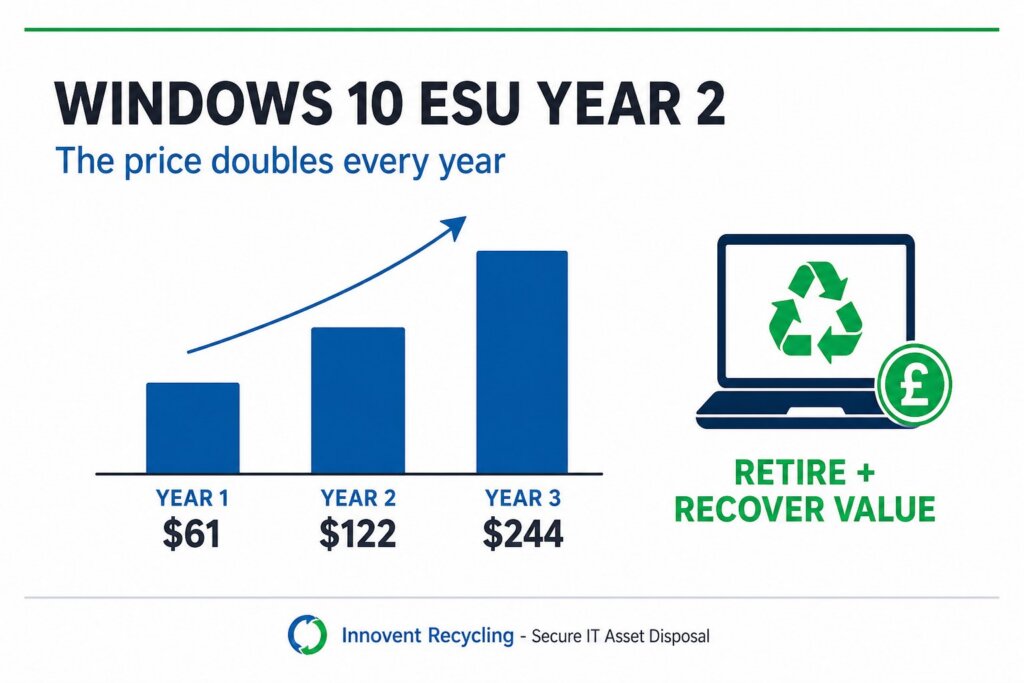
If your business is still running Windows 10, the second year of Extended Security Updates is where the arithmetic turns. Microsoft priced Year One at $61 USD per device through Volume Licensing and states plainly that the price doubles every consecutive year, to a maximum of three. That puts Windows 10 ESU Year 2 at $122 per device, and Year Three at $244 - for updates alone, on hardware that is already past its supported life.
Key facts: Windows 10 ESU Year 2
- Windows 10 reached end of support on 14 October 2025. ESU Year One coverage began in November 2025.
- Commercial ESU was $61 USD per device for Year One, and Microsoft states the price doubles each consecutive year - $122 for year two, $244 for year three.
- ESU licences are cumulative. If you did not buy Year One and want to enrol in Year Two, you must pay for both.
- Cover is capped at three years, ending in 2028. There is no fourth year to fall back on.
- ESU is security updates only. No new features, no non-security fixes, and no general technical support for Windows 10 itself.
- Devices must be on Windows 10 version 22H2 to be eligible at all.
What actually changes in Windows 10 ESU Year 2?
The cover does not change; the price does. Windows 10 ESU Year 2 delivers the same critical and important security updates as Year One, with no new features and no general support, at double the per-device cost. Nothing about the deal improves in year two - you simply pay more for the same protection on ageing hardware.
That matters because ESU is a holding position, not a strategy. It buys time to migrate, and the meter runs faster each year you delay. A fleet that felt affordable to hold at $61 a device looks very different at $122, and worse again at $244. Microsoft's own guidance is that eligible PCs should move to Windows 11, or be replaced.
The cumulative rule sharpens it further. If you skipped Year One and now want cover, buying Windows 10 ESU Year 2 means paying for both years together to bring the device into compliance. There is no way to buy in cheaply at a later date.
How much does Windows 10 ESU cost across the full three years?
Per device, Microsoft's published list prices total $427 USD over the maximum three-year term. That is the ceiling for keeping one unsupported machine patched to 2028 - before any migration work, and before any of the productivity or hardware-failure costs that come with running old kit.
| Term | List price per device (USD) | Running total | What you get |
|---|---|---|---|
| Year One (from Nov 2025) | $61 | $61 | Critical and important security updates only |
| Year Two | $122 | $183 | Identical cover, double the price |
| Year Three | $244 | $427 | Identical cover, final year available |
These are Microsoft's published Volume Licensing list prices in US dollars. What a UK business actually pays depends on its licensing agreement and reseller, so treat the table as the shape of the decision rather than a quotation. The shape is what matters: the cost of standing still roughly doubles annually, while the residual value of the hardware you are protecting falls the whole time.
There are exceptions worth checking before you budget. Microsoft provides ESU at no additional cost for Windows 10 virtual machines in Windows 365, Azure Virtual Desktop and several other Azure services, and endpoints connecting to Windows 365 Cloud PCs are entitled to ESU for up to three years with an active subscription.
Which Windows 10 devices are worth renewing?
Renew where a device cannot move yet for a concrete reason, not where migration has simply not been scheduled. The defensible cases are narrow: machines tied to software that has no Windows 11 build, hardware attached to instruments or production lines, and devices inside a change freeze that ends before the next renewal.
A short, honest triage usually splits a fleet three ways:
- Renew - a genuine technical blocker exists, and there is a dated plan to remove it.
- Migrate - the device meets Windows 11 requirements and only needs scheduling.
- Retire - the device fails Windows 11 requirements, or is old enough that renewal costs a meaningful fraction of replacing it.
The third category is the one that gets missed. Paying $122 to patch a six-year-old laptop for another twelve months, when the machine also has a tired battery and a warranty that expired years ago, is rarely the cheaper option once you count the replacement you will still have to buy in 2027.
What happens to the devices you retire?
They become a data problem and an asset at the same time. Every retired machine still holds business data until it is provably erased, and a working device that is simply cupboarded loses value every month it sits there. The decision to retire is only finished when the hardware has left the building with paperwork attached.
Storeroom drift is the common failure. Devices come off the asset register at refresh, get stacked somewhere convenient, and are still there a year or two later - by which point batteries have aged, the resale market has moved on, and nobody can say with confidence what was on them. The value that would have offset the refresh has quietly evaporated.
Acting while the fleet is being touched anyway is what protects the value. Our guide to IT asset value recovery covers how residual value behaves over time, and why the gap between retirement and collection is the single biggest lever on what you get back.
How do you retire Windows 10 hardware securely?
Erase to a recognised standard, destroy what cannot be erased, and keep serial-matched evidence of both. For UK businesses that means NIST 800-88 software erasure on drives that pass verification, and physical destruction by crushing to HMG IS5 (Enhanced) standard for drives that fail or are damaged. A factory reset is not data destruction and leaves no evidence that anything was done.
The paperwork is the part auditors ask for. A certificate matched to each device serial number, plus an asset report you can reconcile against your own register, is what turns "we recycled them" into something you can actually show. Our guide to data destruction certificates sets out what that documentation should contain.
Innovent Recycling is ISO 27001 certified. We collect free of charge across the UK, provide a signed count of the items collected on the day, and carry out serial-matched wiping or destruction at our facility, with certificates and asset reports following. Nothing we handle goes to landfill, and working devices are assessed for buyback rebates that offset the cost of the refresh that retired them.
Book a Free Collection Call 0151 355 5482
What should a Windows 10 exit plan look like now?
Work backwards from the renewal date rather than forwards from today. Count the Windows 10 devices you still have, split them into renew, migrate and retire, and get a value assessment on the retire pile before you commit to a renewal figure. The rebate on retired kit changes what Windows 10 ESU Year 2 is really costing you.
A workable sequence for most UK businesses:
- Pull an accurate count of Windows 10 22H2 devices, by site, from your asset register.
- Check each against Windows 11 hardware requirements and flag the genuine blockers.
- Price the renewal for the blockers only, using your own licensing agreement rather than list price.
- Get the retire pile valued while the devices are still working and still current.
- Book collection so devices leave close to the point they come out of service, not months later.
- File the certificates and asset reports against your register as each batch completes.
If you are choosing a disposal partner as part of this, our checklist for choosing an ITAD company covers the questions worth asking. Businesses in the North West can find local collection details on our Ellesmere Port and Stockport pages, though collection is free nationwide.
The wider disposal process, including WEEE obligations for the hardware itself, is covered in our Windows 10 end of life recycling guide.
Frequently asked questions
Can I buy Windows 10 ESU Year 2 without having bought Year 1?
You can enrol, but you must pay for both years. Microsoft states that ESU licences are cumulative, so a device joining in year two is charged for year one as well. There is no option to buy a partial period or a single later year on its own.
Does Windows 10 ESU include technical support?
No. ESU delivers critical and important security updates only. Microsoft does not provide general technical support for Windows 10 past end of support, and assistance is limited to activation, installation and regressions caused by the ESU itself, which requires a separate active support plan.
Will Windows 10 PCs stop working after ESU ends?
No, they will continue to run. The risk is that they stop receiving security updates entirely once the three-year ESU term ends in 2028, leaving known vulnerabilities permanently unpatched on machines that may still hold business data. That becomes a security and compliance exposure rather than an availability problem.
What should we do with Windows 10 laptops we cannot upgrade?
Retire them through a certified process rather than storing them. Working devices can earn a buyback rebate that offsets replacement costs, while drives are erased to NIST 800-88 or destroyed by crushing to HMG IS5 (Enhanced). You receive serial-matched certificates and an asset report for your records.
How long do we have before the price rises again?
ESU is sold by annual term and the price doubles at each renewal, with year three the final year available. Because terms cannot be bought in part-years, the practical deadline is your own renewal date - not the calendar. Plan migrations to land before it, not after.